Save and edit content
Inline editor for formatting text
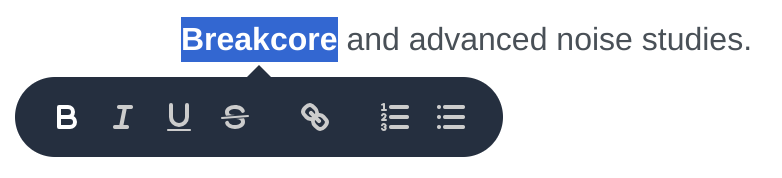
Some fields feature an inline editor, allowing you to apply minor formatting. Those formatting options include:
Bold text
Italic text
Strikethrough
Bullet points
Numbered lists
Links
When entering URLs, they are automatically rendered as valid links. For your convenience you can even copy & paste pre-formatted text and its formatting is preserved.
To use the editor simply select the relevant text and a pop-over menu appears.
Duration Field Magic
Form fields describing a time duration provide a user-friendly way of parsing duration information.

Beside standard formats HH:MM:SS or MM:SS, you can also use the following variants:
hfor hoursmorminfor minutessfor seconds
This means providing a value of 1h 30min is the same as providing a value of 90min or
01:30:00.
The following examples demonstrate the flexibility of the duration field:
23→ 23s5m4→ 5min 4s8h04→ 8h 4s3:2→ 3min 2s23:59:59→ 23h 59min 59s95:300:12→ 100h 12s
Automatic saving
Looking for save buttons? Search no more.
Any changes to form data is automatically transmitted to the server. When some automatic saving is in progress, this is indicated by a saving… icon, located next to the form element.

Changes affecting the appearance of Dashboard are saved to your browsers local storage. Next time you login to Dashboard they are applied automatically.
Information on data changes
Some pages display information about the date and time the record was created and when it was last updated. Depending on the page this information is located at the header or footer of the page.
