Image management
It is possible to upload images for shows, episodes and profiles.
Ownership of uploaded images to shows and episodes is tied to the show. Every user in the editorial team of a show can upload and manage images for that show. Ownership of uploaded images to profiles is tied to the user.
Choose image
First click the choose image button in the image block.

The next dialog allows you to either upload, choose an existing image from the gallery or edit the current image.

Click Upload new image to choose an image for uploading. Next the edit image dialog will open up.
Click the button Browse images to choose an already uploaded image from the gallery.

You can also click Edit the current image which leads to the edit image dialog.
Edit image
The edit image dialog allows you to provide image metadata and modify the image appearance.

After editing hit Save changes to apply the modification. If you decide to go without an image, click Reset image on the right bottom.
Image modification

The floating action bar provides several tools to adjust your image:
Flip: Vertical or horizontal
Rotate: 90° left or right
Crop: Crops the image to the required aspect ratio
Cropping
Use this tool if the uploaded image’s aspect ratio does not match the requirements for the show, episode, or profile. Images with incorrect aspect ratios will be rejected during saving.
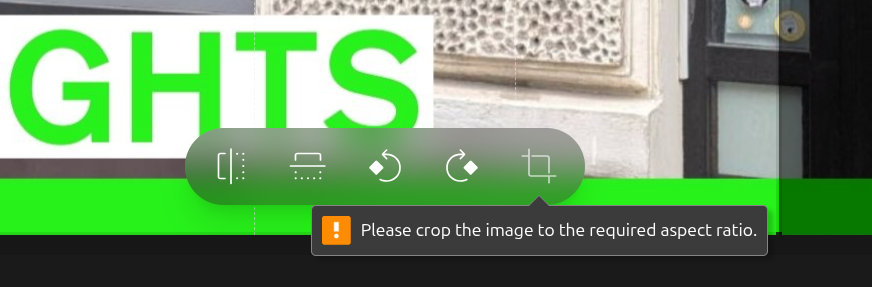
First, adjust the highlighted cropping area to your desired position, then click Crop to apply the changes.
The available aspect ratios follow the station’s global configuration in the Radio Station Settings.
Image metadata and licensing
Following metadata can be set:
- Alternative Text:
This is required for accessible websites. So try to provide a meaningful image description.
- License:
Set the correct license of the image. When in doubt, contact the person holding the ownership rights.
- Credits / Author:
The name of the person or organization credited for this image.
- Use was explicitly granted by author:
Check this option only if you have written permission to use the author’s work.
Choose the proper license
Proper licensing of media assets is critical for maintaining legal compliance and respecting intellectual property rights.
Learn more about licensing in the Media Licensing chapter.